





Appreciation
Huge thanks to everyone who joined our user research! Your feedback was instrumental in shaping the design and making it better for everyone.
Disclaimer
This project was conducted purely for research purposes and is in no way intended to replace the official Tesla website. It was not affiliated with or developed in collaboration with Tesla’s software development team.
Tesla has a strong brand identity rooted in innovation, minimalism, and emotional resonance. However, its current website experience, although highly functional, is meant to replicate the physical showroom feel when shopping for a car online; therefore, it lacks the immersive appeal of its physical counterpart.

This UX case study explores the redesign of Tesla's website into a fully immersive 3D showroom, informed by insights from user and sales agent interviews.
The current Tesla website is designed to be highly functional and to minimise distractions, making the buying experience straightforward. To achieve this, the website presents car information and a purchase option to the user, using minimal text and corresponding images.
Case Studies
I conducted two interviews to assess the effectiveness of this method. To this end, I interviewed two groups of people.

Tesla owner with user experience.
A salesperson in a Tesla showroom meets many customers and understands what they are looking for to recreate the same emotional experience.

The overlap between the two interviews indicates that buying is an emotional journey and that making a purchase requires an emotional attachment.
The Tesla owner says he has driven Tesla cars before and loves their feel. After viewing the website, he made sure to visit the showroom to see what he wanted to buy.
The Tesla Sales representative at the store also confirmed that most people want to buy a Tesla because of the emotional appeal they experienced after chatting with them and showing them some of the car's features in the showroom.
I don’t aim to reinvent the wheel here. Tesla has already found a way to make the website highly efficient. My task here is to enhance the website's emotional appeal. I am going to be focusing on the following aspect
Homepage
Similar to the physical showroom, I aim to create a virtual showroom with all cars visible in 3D so users can interact with them.
Order now Page
As a game Designer myself, I know just how cool it is to have a 3d customisation view.
During my visit to the Tesla showroom, I asked the sales representative, “If a feature were missing from the Tesla website, what would it be?” He confidently said, “ME.” He explained that clients need a guide to explain the feature and show how owning a Tesla might change their lives. At the core of humans is the need for certainty. And the sales agents are present at the showroom to remove all doubt that might hinder sales.
Virtual Sales Rep
To recreate the same experience on the website, I will be adding a voice assistant virtual sales assistant again, an AI trained to understand all the core parts of the care, and more importantly, the AI will be trained to understand empathy and the buying psychology.
This is the tesla sitemap but with a more immersive approach

I drew some sketches based on photos I took at the physical showroom. I considered how to translate my research and its appeal into a design that conveys emotion. These sketches gave me an idea of what would work and what wouldn’t.

Of the four sketches, the second and third are the most suitable for the Home screen, but I couldn’t decide which would work best.
So I proceeded to make a low-fidelity 3D prototype using software like Blender and Spline to test which one would work best in terms of interactivity and emotional appeal without taking the user's focus away from the content.
For the second concept, I made the Second concept a full 360-degree turntable so the user could turn the camera a full 360 degrees around the cars

While for the Third Concept, I made the camera view still have a little user control for the camera view.

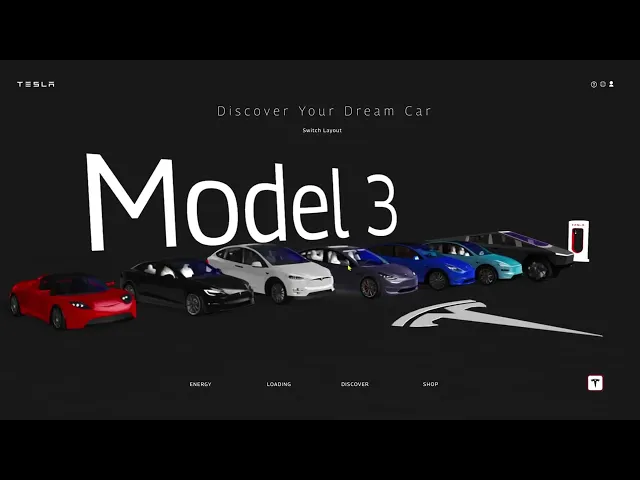
Arrangement based on the Tesla models, Clockwise from the first model, which is the Tesla Roadster, to the last, which is the Cybertruck. The only exception here is the New Model Y, which makes more sense to place beside the previous model.
Homepage
I made two different iterations of the home page design to test the emotional appeal.
I removed the Vehicle tab from the Tesla website and moved the vehicles to the homepage so they appear as the first thing users see when they land.
For the Plate Number, I formatted the car names as plate numbers and placed them in front of each car.
While for the Tab of the UI (Energy | Loading | Discover | Shop), I moved it below.
Order page
I made two different iterations of the home page design to test the emotional appeal.
I made the vehicle animated to show the feeling of it being on the road.
On the current Tesla website, the images and content changes are selected; to replace this, I added mouse scroll interaction to show the car features by rotating the camera to the selected part on the menu bar.
Finally, I hid the price and additional information and made them appear only when highlighted.
After this, I went back to my two different Testers. The Tesla Agent and the Tesla owner, and here is the feedback I got from them.
Homepage
The first feedback I got was: "The Tesla sales agent says most of their buyers are older and wear glasses, so making the letters on the home page bolder and more legible would be great."
Both testers chose Homepage version 1 over Homepage version 2. The reason is that the popping to indicate the highlighted item is not very stylish, whereas in the first version, only the headlamp and the glow show a sleek design, and both look sleeker when navigating the cars.
The placement of cars and camera angle seems to be what they both spoke about; perhaps it’s not hitting that emotional appeal for them
Order now Page
For this, I got is to always show the price upfront.
I also got that the 3d Outline button on the “Order page version 2” looks too gimmicky and should have a more flat feel, so they went for version 1
The Order now” button on the first version is preferred to always be visible to reduce the friction of purchase.
But overall, the Order now page seems to be well-received.
The result of the feedback was that it’s all about the emotional appeal, and something about the arrangement of the cars doesn’t quite click for the test group. I guess the car's size on the screen doesn't look enticing enough; it should be displayed large enough so the buyer is enticed. So I will have to redo the homepage
Overall, the Order now page seems to be well-received; just a few minor tweaks, and I am good to go.
After creating four additional designs, I went in search of general car owners, not specifically Tesla owners, but a mix of people who use all kinds of cars.
I aim to test which design works best for people who are in different phases of life in terms of
Age
Education
Taste
Sex
It turned out, to my surprise these designs don’t have the same effect as my initial design.
I hypothesised that people tend to gravitate towards what they know, which is why I made the garage and horizontal parking designs, which seem to have the opposite effect, as people didn’t want what they were already familiar with.
The Merry-Go round design doesn’t display all the cars, while the Museum Design seems to be scattered across the floor.
Although the initial design is preferred, it is because I reduced the viewing angle.
It is important to note that during the first user interview, participants were trying to adjust the camera's view because it has a slight degree of freedom.
I asked them why, and most of them said the view was not comfortable for them. I did a little research and found out that people are
What stood out
One thing that stood out among these was the Font size. They loved the huge typeface and how easily they could identify the cars' names without having to squint or rely on limited knowledge of which car was which.
After getting feedback on the font size in my initial design, I asked myself, "How can I make the car names appear while also filling the blank background?"
So I made a bunch of designs varying the position and the placement of the text.

Text Style 1

Text Style 2

Text Style 3

Text Style 4

Text Style 5

Text Style 6

Text Style 7
I tested these new Text designs on the last test group. Although they seem to have different preferences. I had them choose a top three and select the most common design from their choices; that design is style 7.
From this UX and UI design, I learned that the phrase “People don’t know what they want” is partially true. The issue is in the communication; people don’t generally know how to communicate what they want, but “when they see it, they know they want it”.